Headers, footers & decorations
Everything that frames the page rather than sits in the content flow — size and margins, running headers and footers, decorative layers and watermarks — lives in Page setup and the page right-click menu.
Page setup
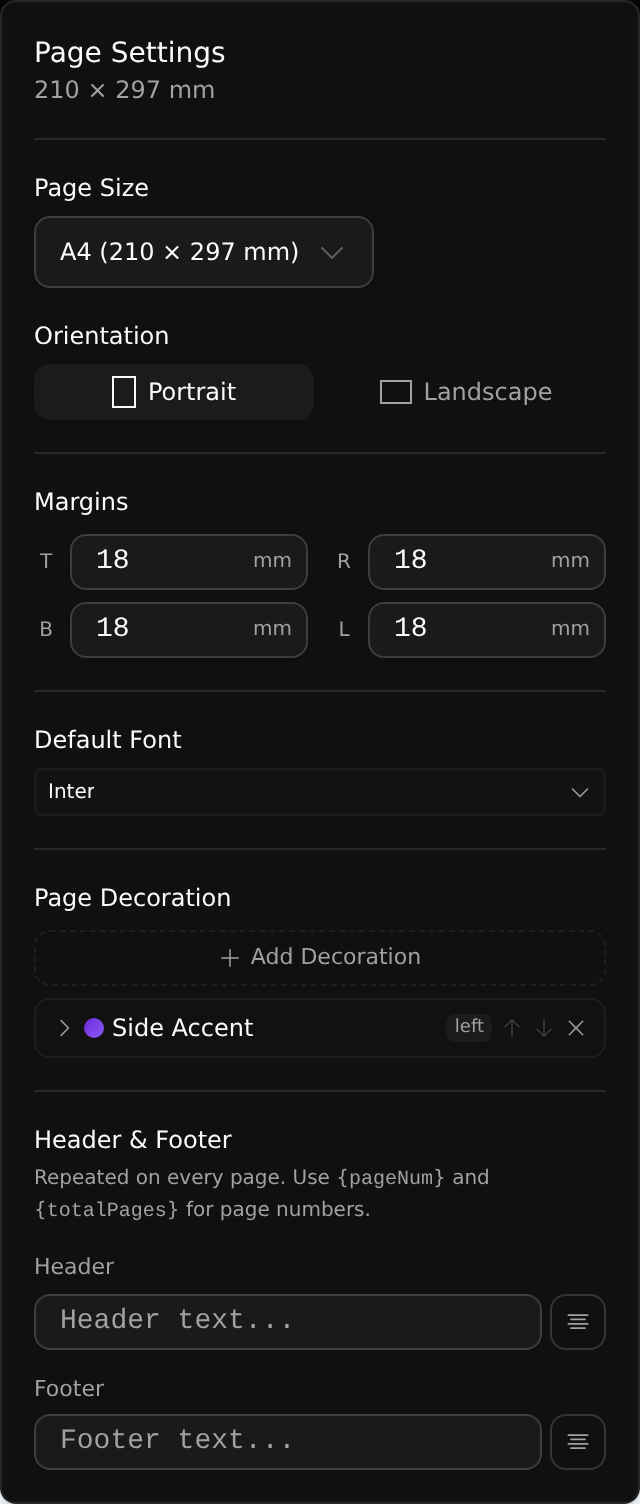
Open Page setup from the page-size pill in the toolbar. Set the page size (A4, Letter and friends), orientation, the four margins, and the document's default font. These define the sheet everything else flows onto.
Headers & footers
A header and footer repeat on every page. Type the text, choose its alignment, and use the tokens {pageNum} and {totalPages} for automatic page numbers (for example Page {pageNum} of {totalPages}). They render into the PDF on every page exactly as set.
Decorations
Decorations are a library of page-styling presets you stack as layers — backgrounds, frames, edge accents, corner brackets, bands and more. Examples include Solid background, Gold frame, Side accent, Corner brackets, Gradient border, Certificate and Top/bottom bands.
- Add Decoration to stack a preset; reorder or remove layers in the list.
- Apply a decoration to the whole document, or override it for a single page.
Watermark
Right-click a page and choose Edit Watermark to add a text or image watermark — angle, opacity, position and tiling included. Like decorations, it sits behind (or above) your content and prints with the document.
Note