Accessible PDFs for state and local government
The ADA Title II rule requires states, counties, cities, school districts, colleges, courts, libraries and transit agencies to make their web content meet WCAG 2.1 AA, and that includes the PDFs they post. The ReflowPDF editor downloads PDFs as tagged PDF/UA-1 by default, and rebuilds the PDFs you already have as documents you can correct.
- April 26, 2027
- States, and local governments of 50,000 people or more
- April 26, 2028
- Local governments of fewer than 50,000 people, and special district governments
The compliance dates of the rule, as moved one year later by the Department of Justice’s interim final rule of April 20, 2026; the standard did not change. Checked against ada.gov on 4 November 2026.
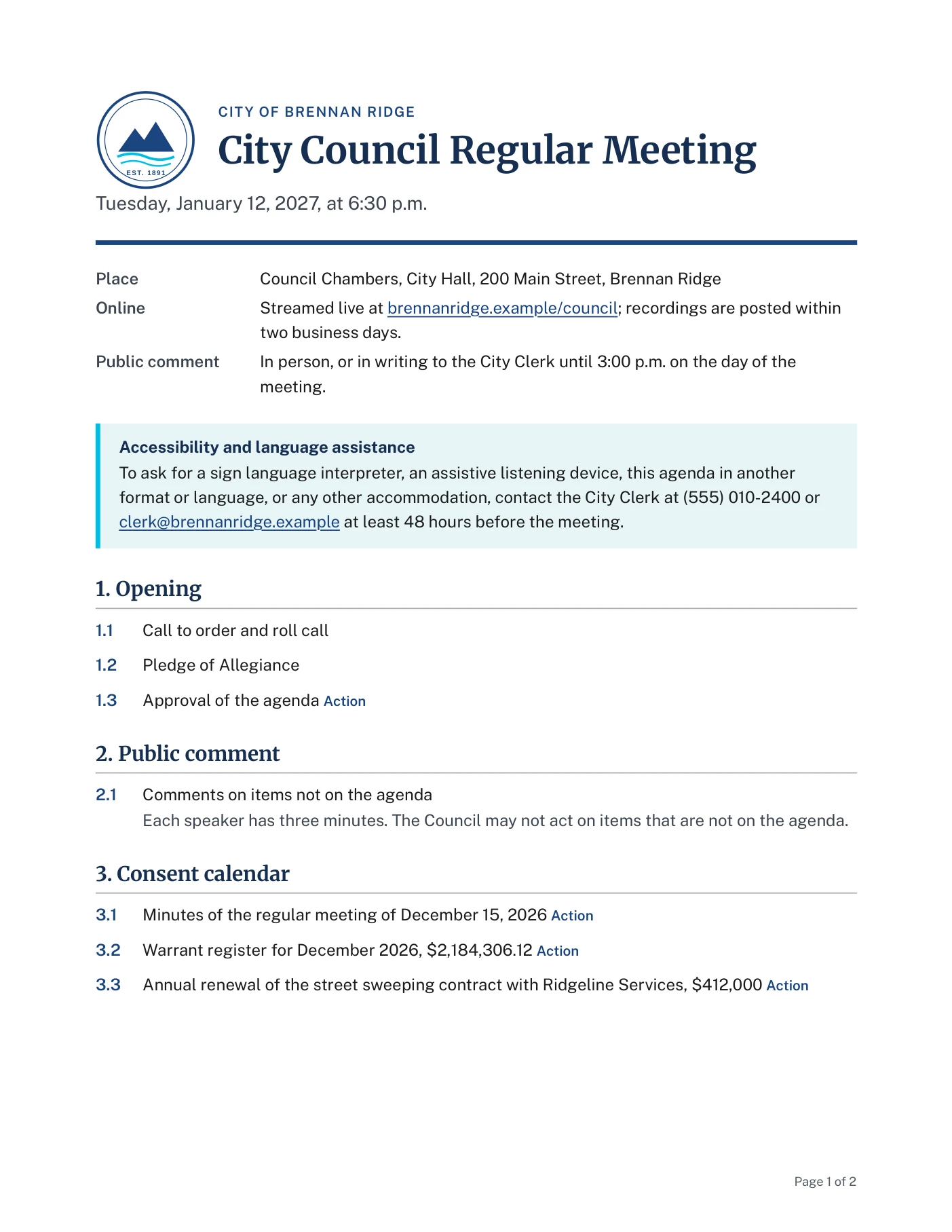
What a screen reader announces
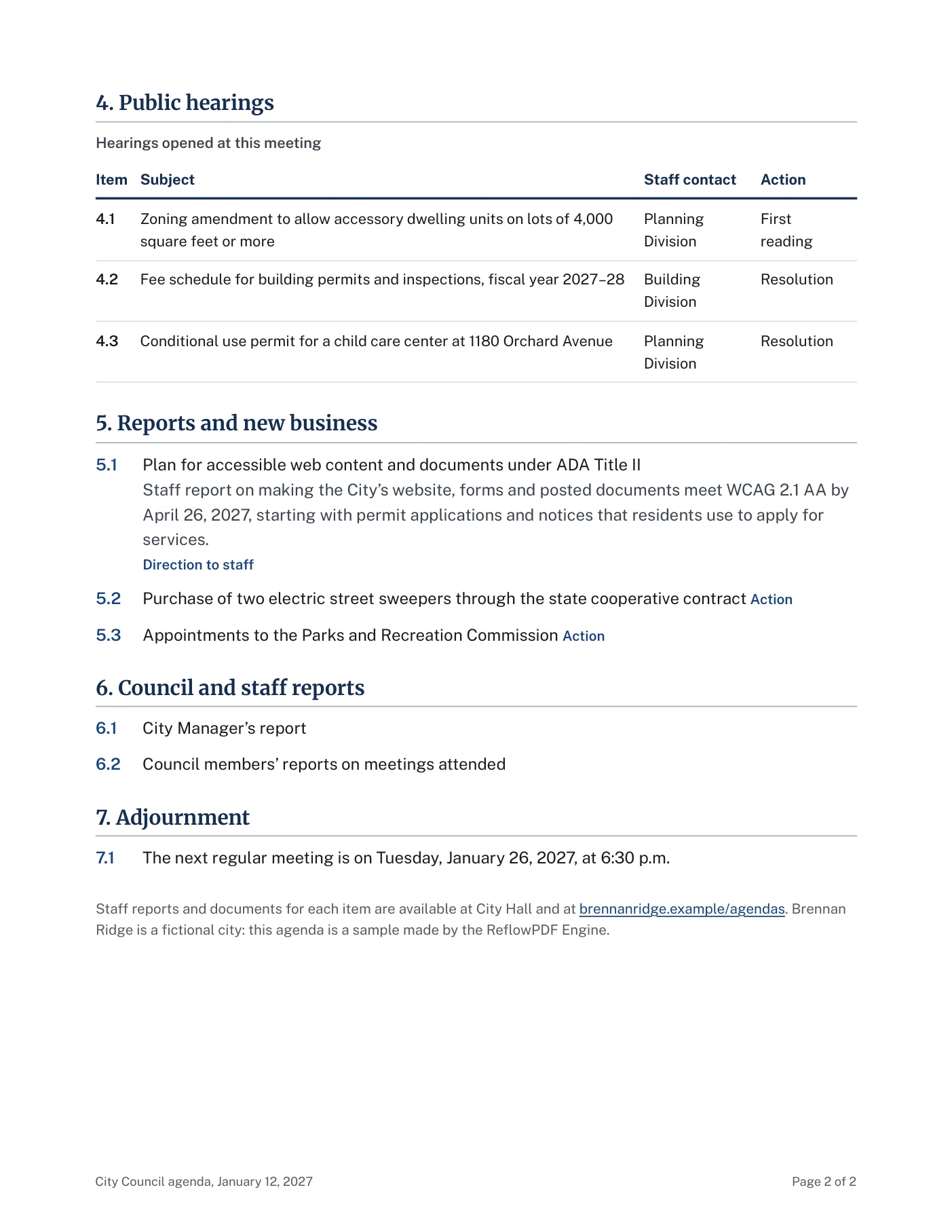
A council agenda of a fictional city, made by the ReflowPDF Engine. Read from the file, in the order a screen reader takes it: the seal’s description, the headings, the agenda items as lists, the public hearings as a table with column and row headers. The page numbers and the footer are marked as page furniture, so it skips them. Language: English (en); title: City Council Regular Meeting Agenda, January 12, 2027; 9 bookmarks from the headings.
- Figure“Graphic, Seal of the City of Brennan Ridge: mountains over a river, established 1891”
- H1“Heading level 1, City Council Regular Meeting”
- L“List, 3 items. Place Council Chambers, City Hall, 200 Main Street, Brennan Ridge”
- H2“Heading level 2, Accessibility and language assistance”
- P“To ask for a sign language interpreter, an assistive listening device, this agenda in another format or language, or any other” …
- H2“Heading level 2, 1. Opening”
- L“List, 3 items. 1.1 Call to order and roll call”
- H2“Heading level 2, 2. Public comment”
- L“List, 1 item. 2.1 Comments on items not on the agenda Each speaker has three minutes. The Council may not act on items that are not on” …
- H2“Heading level 2, 3. Consent calendar”
- L“List, 3 items. 3.1 Minutes of the regular meeting of December 15, 2026 Action”
- H2“Heading level 2, 4. Public hearings”
- Table“Table, Hearings opened at this meeting, 4 columns, 4 rows. Column headers: Item, Subject, Staff contact, Action.”
- H2“Heading level 2, 5. Reports and new business”
- L“List, 3 items. 5.1 Plan for accessible web content and documents under ADA Title II Staff report on making the City’s website, forms and” …
- H2“Heading level 2, 6. Council and staff reports”
- L“List, 2 items. 6.1 City Manager’s report”
- H2“Heading level 2, 7. Adjournment”
- L“List, 1 item. 7.1 The next regular meeting is on Tuesday, January 26, 2027, at 6:30 p.m.”
0 of 6,753
checks failed: veraPDF 1.30.2, PDF/UA-1, 4 November 2026.
| File | veraPDF checks | Failed | Report |
|---|---|---|---|
| Agenda, PDF/UA-1 34 KBThe one to post: PDF 1.7, read by every PDF reader | 6,753 | 0 | veraPDF report |
| Agenda, PDF/UA-2 34 KBThe 2024 edition of the standard, on PDF 2.0 | 10,541 | 0 | veraPDF report |
Check it yourself, or one of your own PDFs, with the free PDF accessibility checker.
Which PDFs the rule covers
Every PDF a public entity posts on or after its compliance date, and those posted before it that are currently used to apply for, take part in or use a service, program or activity, such as a permit application or a form still in use. An excepted document must still be made accessible when a person with a disability asks for it.
Population is the entity’s total population in the 2020 Census; an independent school district uses the Census Bureau’s Small Area Income and Poverty Estimates, and a department such as a city library or police department uses the population of the government it belongs to.
Excepted, under conditions
- Archived web content
- All four together: created before the compliance date (or a copy of older paper or media), kept only for reference, research or recordkeeping, kept in a special area for archived content, and not changed since it was archived.
- Documents posted before the compliance date
- Word, PDF, presentation and spreadsheet files, unless they are currently used to apply for, take part in or use a service, program or activity. ada.gov’s example of one that is excepted: a parade flyer posted in 2018.
- Content posted by third parties
- Such as residents’ comments. Not excepted: content your vendor or contractor posts for you, and the tools that let people post.
- Documents about one person, property or account
- When they are behind a password or otherwise secured, such as a water bill.
- Social media posts
- Those made before the compliance date.
A summary of ada.gov’s fact sheet, checked on 4 November 2026, not legal advice. The rule is an interim final rule; the Department of Justice took comments until June 22, 2026.
What ReflowPDF does about it
- New documents
- Agendas, minutes, notices, reports and letters made in the editor download as tagged PDF/UA-1 by default, on every plan, Free included: headings, lists, tables with header cells, image descriptions, links, language, title and bookmarks.
- The PDFs you already post
- AI import rebuilds a PDF as a document you can correct; you check its headings, image descriptions and table header cells, and download it tagged. It works best on structured documents.
- Checks in the editor
- More than thirty checks, run from Accessibility in the toolbar, list what a screen reader would stop at: an image without a description, a heading level that jumps, a table without header cells, text with too little contrast, a link that does not say where it goes.
- A report on your own file
- On Pro and Max the editor checks the PDF you are about to download with veraPDF, the reference validator, against PDF/UA-1 or PDF/UA-2.
- Documents your systems print
- Permit letters, notices and statements made by software can be printed by the engine itself: through the HTTP API (api.reflowpdf.com/v1, documented) that comes with every plan, or under license as a server program for your own servers or a WebAssembly package.
Make your next agenda here
The agenda on this page is a template in the editor, with its data beside it: put in your body’s name, seal, meeting and items, and the PDF comes out tagged, as this one. Or import the agenda you posted last month and correct it.
ReflowPDF is a full member of the PDF Association, the industry association behind PDF/UA and PDF/A.


Before you buy
- Price
- The editor and tagged PDF/UA-1 are free. Without an account every downloaded page carries a small ReflowPDF mark; a free account gives 50 pages a month without it; Pro, $10 a month or $100 a year, removes it from every page and adds PDF/A-3a, PDF/UA-2 and the veraPDF check.
- A backlog of PDFs
- AI import uses one AI page for each page of the PDF: 10 a month on Free, 150 on Pro, 1,000 on Max, and, on Pro and Max, $8 for 100 more, which do not expire.
- Fillable forms
- A form made in the editor downloads with fillable, labelled fields. A form imported from another PDF comes back as its text and lines: its fields are added again in the editor.
- Scanned pages
- A scanned page has no text to rebuild: it comes back as a picture of the page, and its text has to be typed or recognised first.
- Where files go
- Without an account documents stay in the browser. An imported PDF is sent to Google’s Gemini models and not kept; the rebuilt document is kept 180 days after it was last opened, and rebuilt documents are used on our servers to check and improve imports, never to train AI. Ask AI sends the selected block to Anthropic’s Claude models. A print’s copy is kept 30 days on Free and without an account, not at all on Pro and Max.
- Procurement
- No accessibility conformance report (VPAT) for the editor yet. For invoices, purchase orders or an engine licence, write to hello@reflowpdf.com.
The privacy policy says what is kept and for how long; the plans and prices are on their own page.
Other rules that require accessible PDFs
| Rule | Who | What it requires of PDFs |
|---|---|---|
| Section 508 of the Rehabilitation Act | US federal agencies, for the technology they develop, buy, maintain or use | WCAG 2.0 AA for documents; and under 504.2.2, an authoring tool that exports PDF must be able to export PDF/UA-1. The ReflowPDF editor exports PDF/UA-1. |
| HHS Section 504 rule (45 CFR 84) | Recipients of HHS funds, such as county health and human services departments and public hospitals | WCAG 2.1 AA for web content and apps: by May 11, 2027 with 15 or more employees, May 10, 2028 with fewer, as moved by HHS’s interim final rule of May 2026. |
Questions
Is a tagged PDF/UA-1 file enough to meet WCAG 2.1 AA?
Tagging gives a PDF the structure WCAG relies on, and veraPDF can check it. Some of WCAG 2.1 AA only the author can supply: text alternatives that say what an image shows (1.1.1), headings and labels that describe their content (2.4.6), link text that says where it goes (2.4.4), meaning not carried by colour alone (1.4.1), and enough contrast (1.4.3). The editor’s checks point at the ones it can detect; a WCAG review still has the last word.
Does ReflowPDF meet Section 508’s requirement for PDF export?
Section 508’s 504.2.2 requires an authoring tool that exports PDF to be able to export PDF/UA-1 (ISO 14289-1). The ReflowPDF editor exports PDF/UA-1, and does so by default.
Can we try it before buying?
Yes. The editor opens in the browser without an account, and its downloads are tagged PDF/UA-1 by default, with a small mark on each page. A free account adds AI import and 50 pages a month without the mark.