Loading…
Free template
Recommendation Letter Template — Free & Fully Editable
Open a polished recommendation letter, swap in your details, and download a clean PDF in two minutes.
Free in your browser · no account to try · no install
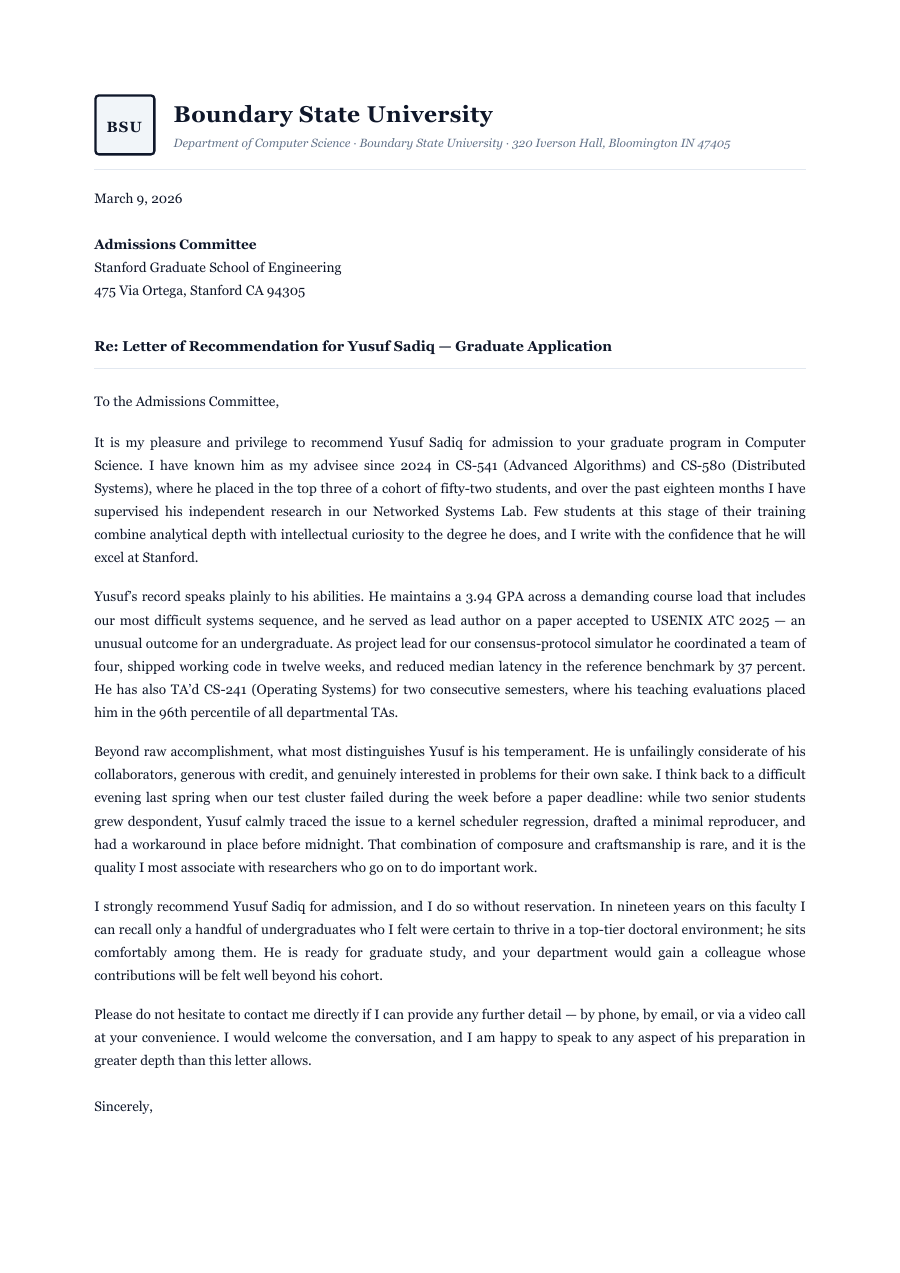 2 pages
Someone asked you to vouch for them — and now you're staring at a blank page, or a Word file that falls apart the second you touch it. Start here instead. This letter is already built the way a strong recommendation should read: a clean letterhead, a proper date and address block, three paragraphs that actually carry weight, and a signature that sits where it belongs. Change the name, rewrite a sentence, drop in a whole new paragraph — the letter reflows around you and stays sharp the entire time. Two minutes later you export a real, tagged PDF that opens perfectly anywhere you send it.
Inside the Recommendation Letter template
A letterhead with sender and recipient address blocks — swap in your own in a click
Date line, salutation and a proper closing, already in place
Three body paragraphs — the intro, the case, and the close — with guidance you type right over
A signature block with name, title and contact line
Spacing, margins and type that hold their shape no matter how much you rewrite
How to write a Recommendation Letter
1
Open it — no sign-up
Hit “Open the template” and the letter loads straight into the ReflowPDF editor in your browser. Nothing to install, no account to create, no watermark to dodge.
2
Make it yours
Click any line and type — names, dates, the specific things you actually want to say. Every paragraph reflows to fit as you go. The layout never lurches, never breaks.
3
Say more when you need to
Add a paragraph, cut one, stretch the close. Everything below flows down on its own — spacing, the signature, even the page break onto the next page. You never drag a text box.
4
Export a real PDF
Download a tagged, accessible PDF (PDF/UA) — the kind that reads correctly on a screen reader and passes the checks a Word “Save as PDF” quietly fails.
5
Reuse it next time
Your export carries its own editable source, so you reopen this exact PDF in ReflowPDF later and change one name — instantly, no reconversion, no starting over.
See it in the real editor
Real editor, real reflow: type into the letter and the paragraphs below flow down — right across the page break onto page 2. No dragging, no broken spacing.
Why write your recommendation letter in ReflowPDF
Edit it without wrecking it
Type a longer sentence and the paragraph grows; add a line and everything below slides down — right across onto the next page. It reflows like a document should, not like text glued to a page.
A real PDF, not a flat image
The text stays live — selectable, searchable, accessible. Canva and “export to PDF” hand you a picture of a letter. This is the letter.
Tagged & accessible by default
Every export is a tagged PDF/UA file, on every plan including free. Most tools bolt accessibility on later, if ever. Here it just happens.
Yours to reopen, forever
The embedded source means no lock-in and no redo — reopen and re-edit any letter you've exported, months later, in seconds.
Template vs Word vs Canva
A Word template makes you own Word, and its “Save as PDF” spits out an untagged file that fails accessibility checks. Canva looks great until you try to edit the PDF back — you can't, and it's a flat image anyway. ReflowPDF keeps the letter a real, structured document the whole way: edit it in the browser, export a tagged PDF, and reopen that same PDF whenever you need to change a line.
FAQ — recommendation letter template
Is it actually free?
Yes — open it, edit it, and download a PDF on the free plan, watermark-free within a generous monthly limit. Paid plans lift the limits and add things like accessibility preflight and archival PDF/A export.
Can I edit the letter after I download it?
Yes, and this is the part every other tool gets wrong. Your exported PDF carries an editable source, so you reopen the downloaded file and keep editing — no conversion, no re-typing.
Will the layout survive my edits?
That's the whole point. Rewrite a sentence, add a paragraph, delete one — the letter reflows and the spacing, signature and page breaks adjust themselves. It always looks composed, never “edited.”
Is the exported PDF accessible?
Yes. Every export is a tagged PDF/UA document with real heading structure, reading order and language — so it works with screen readers and passes validators like veraPDF. Word's “Save as PDF” usually doesn't.
Do I need to install anything?
No. It runs in your browser. Open, edit, download — nothing to install, and nothing to sign up for just to try it.
Make your recommendation letter now
Open the template, edit it in your browser, and download a clean tagged PDF. Free, no account, no install.