Complaint letter template
A formal complaint from a customer to a home furnishings company about an order delivered late and damaged, written to be kept on record: the date, the department’s address, a reference line with the order and customer numbers, what happened, what was tried, the resolution asked for and by when, and what happens next if there is no reply.
It opens without an account. This PDF was downloaded from the editor; without an account, each page you download carries a small mark.
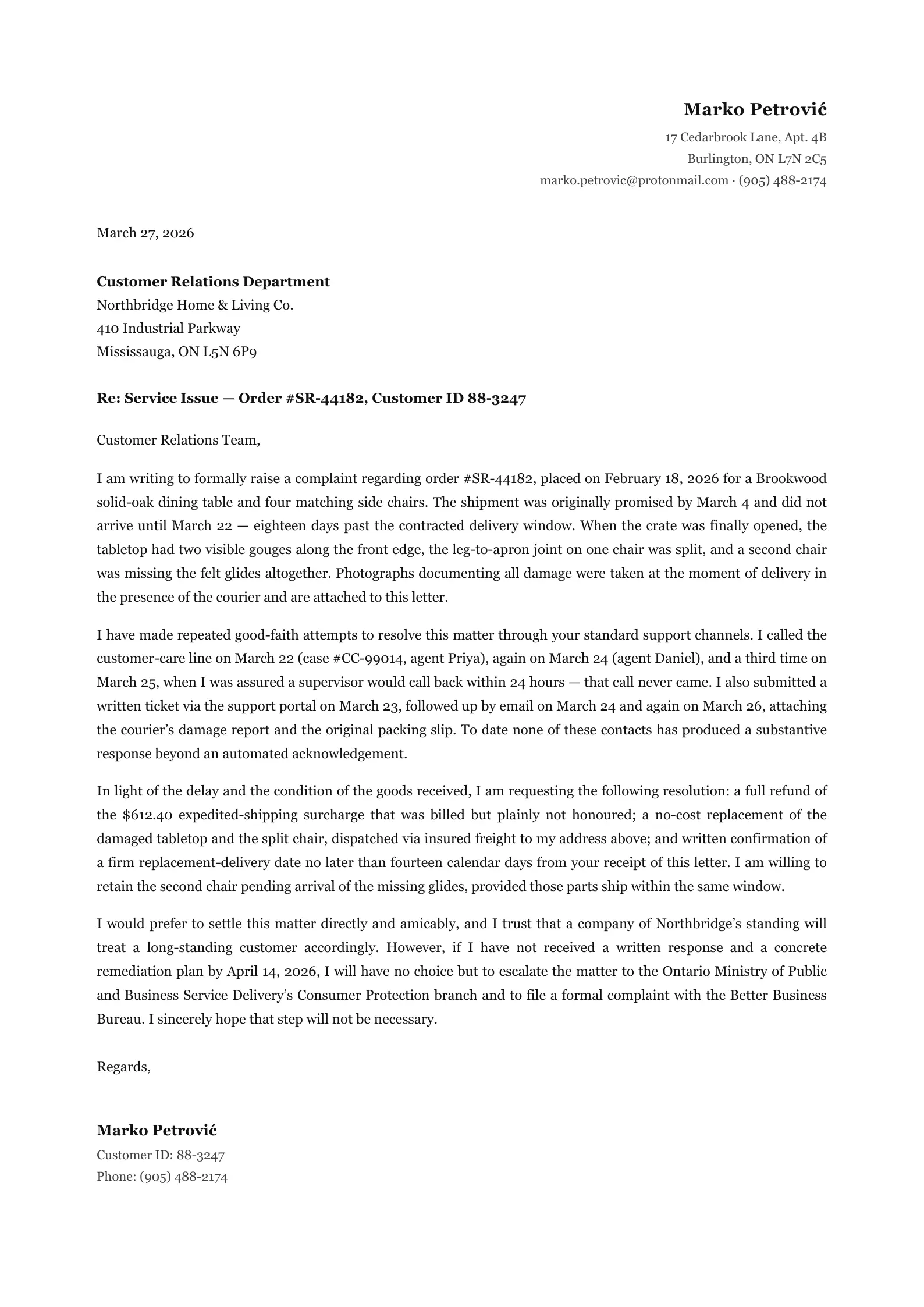
What is in it
- The date and the company department’s address
- A “Re:” line with the order number and customer ID
- Paragraphs on what was ordered and what went wrong, the attempts to resolve it, and the resolution requested
- A closing with your name, customer ID and phone
1 page, tagged PDF/UA-1
Editing it
Replace the order and customer numbers, and say what went wrong in your own words; the paragraphs after it move down, onto a second page if they have to.
Its colours, default font and paper size are in Page settings, and its HTML and CSS in the Code view. When it is done, download the PDF.
Questions
- What should a complaint letter include?
- The order or account reference, dates, what went wrong, what you have already tried, the resolution you want and a deadline. This one has each of them in that order, so you can replace them one by one.
- Can I attach photos?
- Add an Image block below the letter, or on a second page, with a short description for each photo so it is read out by a screen reader.
- Do I need an account?
- No. The template opens in the editor without one, and you can download the PDF; without an account every page carries a small mark in the corner. A free account gives 50 pages a month without it.
- Can I open the PDF again later and keep editing?
- Yes, if you download it with “Keep the PDF editable” switched on: the document travels inside the PDF, and imported into the editor again it comes back as it was, without AI. The switch is off by default. With an account, the document is also kept in your Library.
- Is the PDF accessible?
- By default it is tagged for screen readers as PDF/UA-1: headings, lists, tables with their header cells, the language and the title. The editor points out what only you can fix, such as an image without a description.
Related templates
Open it and type.
The template opens in the editor in your browser, without an account. Change the words, add rows and pages, and download the PDF.